Rules & licensing
Workplace Surveillance Act NSW: CCTV rules for small businesses
Putting cameras in your shop or office? NSW law generally requires 14 days' written notice to staff, visible cameras, signs at every entrance and no cameras in toilets or change rooms.
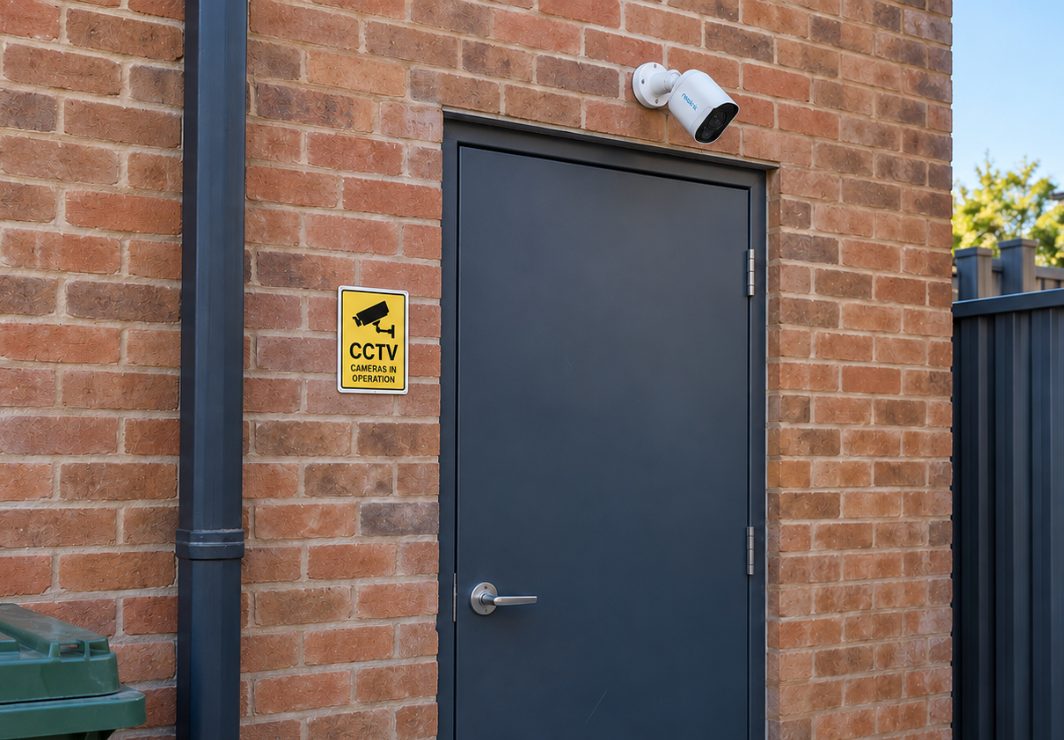
If you run a business in NSW and your cameras can see staff while they're at work, the Workplace Surveillance Act 2005 (NSW) applies. You generally need to give staff written notice at least 14 days before recording starts, keep the cameras clearly visible and put a sign at every entrance to the area being filmed. Cameras are banned outright in toilets, change rooms and showers, and recording audio brings in a separate law, the Surveillance Devices Act 2007.
Below is what each rule means for a shop, café, office or workshop in Sydney, with a checklist to work through before the cameras go up. This is general information, not legal advice. For your own situation, read the Act itself or talk to an employment lawyer or your industry association.
Does the Workplace Surveillance Act apply to my CCTV?
The Workplace Surveillance Act 2005 covers surveillance of employees while they are "at work". It covers three kinds of surveillance: camera, computer and tracking. A security camera that can see a staff member counts as camera surveillance, even if you only bought it to catch shoplifters or break-ins.
In practice:
- You have staff and the camera can see where they work. The Act applies. That includes the counter, the stockroom, the kitchen, the loading dock and the car park.
- You're a sole trader with no employees. The notice rules are about employees, so they generally won't apply to you. A visible camera and a sign are still good practice for customers and visitors.
- The camera only covers your own front door at home. That's residential, not workplace surveillance. If you rent, see our guide to security cameras in a NSW rental.
The current version of the Act on the NSW legislation website has been in force since 28 March 2026, so check that version rather than an older summary. Separately, NSW passed the Work Health and Safety Amendment (Digital Work Systems) Act 2026 in February 2026. It adds safety duties around digital systems used to allocate, monitor or evaluate work, but SafeWork NSW says most of it starts on a date still to be proclaimed. It's aimed more at software than at ordinary security cameras. The direction is still clear: be open and proportionate about monitoring staff.
The 14-day written notice: what it must say
Under section 10, camera surveillance of an employee can't start without written notice. The notice must be given at least 14 days before recording begins, although an employee can agree to a shorter period. An email counts as written notice.
The notice must state:
- the kind of surveillance (for CCTV, "camera")
- how it will be carried out (for example, how many cameras and roughly where)
- when it will start
- whether it will be continuous or intermittent
- whether it's for a set period or ongoing.
New staff: if cameras are already recording when someone starts, or will start recording within 14 days of their first day, they must get the notice before they start work. The easiest way is to include it in the letter of offer or the employment contract.
There is one narrow exception. Notice isn't required for camera surveillance at one of your workplaces that isn't that employee's usual workplace, such as a staff member from your Newtown shop covering a day at your Marrickville one. If you have one site, simply give everyone the notice.
A plain-English notice you can adapt
From [date at least 14 days away], [business name] will operate camera surveillance at [address]. There will be [number] cameras covering [the shop floor, front entrance, rear lane and stockroom]. Recording will be [continuous / intermittent, triggered by motion] and ongoing. No cameras will be placed in toilets, change rooms or showers. Cameras will not record audio. Footage is used for security and safety, and may be provided to police or our insurer if there is an incident.
Pick the option that matches how your cameras are actually set. Most battery and solar cameras record only when motion triggers them, which is intermittent. Keep a copy of the notice, plus a note of who received it and when.
Signs and visible cameras: section 11
Section 11 adds two conditions for camera surveillance:
- the cameras (or their casings, or other equipment that would generally show a camera is there) must be clearly visible where the recording happens, and
- signs telling people they may be under surveillance must be clearly visible at each entrance to that place.
"Each entrance" is where many small businesses fall short. A terrace shop in Enmore or Redfern often has a front door, a rear lane door and a door to the courtyard or bin area. If cameras cover the inside, each of those doors needs a sign, not just the shopfront.
Section 11 doesn't set wording or a size for the sign. It needs to be clearly visible and tell people they may be under surveillance. A sign at eye height beside the door works better than a small sticker low on the glass. Check a few times a year that posters or stock haven't covered it.
Visible cameras suit wire-free systems. A white battery or solar camera mounted above the door is obvious, which is what the law asks for. Tiny cameras disguised as smoke detectors or clocks are a problem in a workplace, as the next section explains.
Where cameras are banned, and why hidden cameras are risky
Section 15 bans surveillance of employees in any change room, toilet facility, or shower or other bathing facility at a workplace. No notice, sign or staff agreement makes it lawful. Also check what a camera can see: one in a corridor that looks through an open bathroom door is a problem even if it's mounted outside.
Break rooms aren't on the banned list. Staff do expect more privacy there, so ask whether a camera is really needed. Often a camera on the back door covers the security risk without filming people eating lunch.
Covert cameras: under the Act, surveillance of employees that doesn't follow the notice and visibility rules counts as covert surveillance. Part 4 of the Act prohibits it unless a covert surveillance authority has been issued. If you suspect theft by a staff member, don't hide a camera yourself. Get legal advice or talk to police.
Can my security camera record audio at work?
The Workplace Surveillance Act deals with images. Sound falls under the Surveillance Devices Act 2007, which applies to everyone, not just employers.
Under section 7, it's an offence to knowingly install or use a listening device to listen to or record a private conversation, subject to limited exceptions such as consent of the parties. The Act's definition says a device can still be a listening device even if it also records images. So a security camera with its microphone switched on can count. Following the workplace notice rules doesn't make audio recording lawful.
For most small businesses the practical answer is simple: turn audio recording off. Many wire-free cameras and video doorbells have a microphone, and many apps let you switch audio recording off in the camera's settings. If we're setting your cameras up, ask us to do it at handover. If you think you have a genuine need for audio, get legal advice first.
Customers and visitors: what's different
The Workplace Surveillance Act protects staff, not customers. There's no NSW rule that customers must get 14 days' notice. But the section 11 signs must tell people (not just employees) that they may be under surveillance, so one good sign at each entrance covers staff and customers at once.
The federal Privacy Act 1988 may also apply. According to the OAIC's small business guidance, most businesses with an annual turnover of $3 million or less aren't covered. However, health service providers and some other categories are covered whatever their size, including physios, pharmacies and childcare centres. If you're covered, how you collect, store and share customer footage matters more. The OAIC's checklist will tell you.
Whatever your size, think about where cameras point. A camera on a Glebe Point Road shopfront will catch the footpath. Angle it to cover your door and windows, and use the app's privacy masking or detection zones to leave out the street and neighbours' windows where you can.
Who can see the footage, and what you can do with it
Section 18 limits how footage of employees can be used or shared. It allows use for a legitimate purpose related to employing your staff or your legitimate business activities, and disclosure to police for investigating an offence. It also allows use connected with civil or criminal proceedings, or to avert an imminent threat of serious violence or substantial damage to property. Posting a clip of a staff member online to embarrass them is not a legitimate purpose.
Some practical habits help:
- Limit app access. Give logins to the people who need them (owner, manager), not every staff member's phone.
- Record less. In our own testing, real cameras were triggered between 34 and 135 times a day. On a busy business driveway, switching to person-only detection with a detection zone cut recordings by about 97%, from around 1,300 a day to under 40. Fewer clips of staff walking past means less to manage and less to misuse.
- Keep an off-site copy of incidents. If a camera is stolen or smashed, the memory card goes with it. Our WireFree Cloud plans store an off-site copy of Reolink recordings in Sydney. You can mark clips to keep and invite others with their own login, so nobody shares a password.
If you need to hand footage over after an incident, our guide on giving CCTV footage to NSW Police or your insurer walks through it.
Checklist before the cameras go live
| Step | Rule | Done? |
|---|---|---|
| Map every camera and what it can see | s 11, s 15 | |
| Confirm no view into toilets, change rooms or showers | s 15 | |
| Write the notice (type, how, start date, continuous or intermittent, ongoing or limited) | s 10 | |
| Email or hand it to every employee at least 14 days before recording | s 10 | |
| Add the notice to new-starter paperwork | s 10 | |
| Mount cameras where they're clearly visible | s 11(a) | |
| Put a sign at every entrance to each filmed area, including rear and side doors | s 11(b) | |
| Turn off audio recording | Surveillance Devices Act s 7 | |
| Decide who has app access and how long footage is kept | s 18 | |
| Check whether the Privacy Act covers your business | OAIC checklist |
Wrap-up
For most Sydney small businesses, complying is mostly paperwork and planning. Send the notice 14 days ahead, mount cameras where they can be seen, put a sign at every door, keep cameras away from bathrooms and change areas, and switch off audio. Do it before the first recording, not after an incident.
If you'd like help with placement, mounting and set-up, see our page on cameras for small businesses and our installation prices. An installer can't write your staff notice for you, but WireFree Security can make sure the cameras are visible, aimed sensibly and set to record video only. Licensing for installers is a separate question, covered in do you need a licence to install CCTV in NSW.
Common questions
Can I use CCTV footage to discipline or dismiss an employee in NSW?
Section 18 of the Workplace Surveillance Act allows footage of employees to be used for legitimate purposes related to their employment, which can include misconduct. Whether footage helps you depends on having followed the Act first: written notice, visible cameras and signs at each entrance. Legal commentary warns that surveillance without a compliant notice may be treated as covert, and the footage may not be accepted as evidence. Get advice from an employment lawyer or your industry association before acting on footage.
Do I need to give notice again if I add another camera?
The section 10 notice has to describe how the surveillance is carried out. So if you add cameras covering new areas, such as a stockroom or rear lane that wasn't mentioned before, it's sensible to send an updated notice and wait 14 days, unless staff agree to a shorter period. If you're only swapping a camera for a new model in the same spot, the original notice may still describe it accurately. Check your notice's wording, and get advice if unsure.
Do the rules apply to cameras on a building site or in a work van?
Generally yes, if employees are at work there. The Act covers employees at your workplace and other places where they're working for you. A site camera covering workers needs the same written notice, visible camera and entrance signs. Cabin cameras that record drivers are camera surveillance too. GPS tracking of a vehicle is a separate category under section 13, which requires a clearly visible notice on the vehicle. Check the Act or get advice for your setup.
Is a video doorbell at my shop or office covered?
If the doorbell can see staff while they're at work, such as when they come and go through that door, it's camera surveillance under the Act. Include it in your written notice and cover that door with a sign. Video doorbells usually have a microphone, so check whether audio recording is switched on. Recording private conversations can fall under the Surveillance Devices Act 2007, whatever your workplace notice says.
Sources
- Workplace Surveillance Act 2005 No 47 (current version from 28 March 2026) — NSW Legislation (Parliamentary Counsel's Office)
- Workplace Surveillance Act 2005 No 47 (PDF, historical version) — NSW Legislation
- Workplace Surveillance Act 2005 – s 18 Restrictions on use and disclosure of surveillance records — AustLII
- Workplace Surveillance Act 2005 – table of provisions (as at 28 March 2026) — AustLII
- Surveillance Devices Act 2007 No 64 — NSW Legislation
- Surveillance Devices Act 2007 No 64 (PDF) — NSW Legislation
- Small business – Privacy — Office of the Australian Information Commissioner
- Legislation – Work Health and Safety Amendment (Digital Work Systems) Act 2026 — SafeWork NSW
- Work Health and Safety Amendment (Digital Work Systems) Act 2026 No 5 — NSW Legislation
- Australian First: Navigating NSW's New Digital Work Systems Amendment — Cowell Clarke
- We are watching you – Workplace Surveillance and the Law — Keypoint Law
General information, not legal advice. Prices are “from” prices; your quote depends on the site.